
HorseRacingUSA.com
Speed/Pace Handicapping with
WINNING AT THE TRACK
Quick HELP for WATT Stand-alone (Classic) Program
Online Program: See the First Steps Help Page
Installing Winning at the Track (WATT)
WATT stand-alone program operates in both Windows and DOS!
Yes, the Windows version will offer sharper graphics and a few new features! Also, for serious handicappers, the Windows version can operate at the same time the DOS version is being usedl, or visa versa. Both programs have essentially the same format. All WATT programs work in Win95, Win98, 2000, XP, Vista, Win7 and Win10. Like many established programs, Winning at the Track will run on the 64-bit systems if the DOSBox (free download) program (or Microsoft's "XP Mode") is installed on Windows 7 and up.
Why continue to sell a DOS-based program today? The answer is easy ... because we have thousands of customers who LOVE it! And yet the only major criticism one will ever hear about WATT is that "it's an older DOS-based." Oh, horsefeathers! If the DOS version is easy to use, if it's good, and it works, why worry? Anyone capable of typing two words, "transfer" and "desktop" can master the DOS segments of Winning at the Track on virtually every personal computer except Apple. The online version works on EVERYTHING.
The Home Page (lower left corner) of HorseRacingUSA.com explains what you'll need to know about DOS and about the WATTdos installation procedure. Ask the publisher if you need help.
Most notable, of course, is the recent introduction of the web-based interactive WATT service. The Home Page of this site provides much information on this new development. Best of all, it's compatible with the stand-alone software because it uses the same DRF data file.
If there is a question or problem regarding WATT, call us at (954) 573-7236. We support our software!
The DATABASE Program and How it Works:
The Winning at the Track DATABASE software has two primary functions: 1) To Transfer data from data source files that have been received from Bloodstock Research (BRIS), a Churchill Downs company; or 2) To Store the history of individual horses if the user wishes to do so. The Transfer segment, however, accounts for 95% of its use.
The DATABASE Transfer segment is used to create WATT race files with BRIS data files (the "Single File" .DRF format). So, in this case, the DATABASE is not used for manually entering data, but only as a means of deciding which data to keep, or which to delete. Thus, a new WATT race file (one race card for one track) can be made in just a matter of minutes for only $1.00 per race card. And, typically, a data source file can be received well in advance -- Thursday night or Friday for Saturday's races. WATT handicappers especially appreciate the total control they have with data entry! The online WATT version is "light years" ahead of the original, but the Classic version still has value.!
Using BRIS Data Files in the DATABASE Transfer Program:
Here is a quick explanation of the DATABASE: The Database
The DATABASE was written to accommodate various data sources. Most used is BRIS. LPC may be adding yet another data service company in its future WATT editions. However, in the meantime, WATT users are limited to BRIS data source files for their Winning at the Track DATABASE "Transfer" program. Here are the details...
The BRIS download service is located on the internet at BRISNET.com. When you visit that site, go to the "Selections, Programs & PP's" section (top left). Scroll down to the Software Data Files table and then find the Past Performance "DRF Data File (single)" entry on the lower portion of their list. The file you want will be a single, comma delineated file, about 400k in size and will have a .DRF extension after it is decompressed. It will be named as such: An Aqueduct file for March 25 would be called AQU0325.DRF. However, the BRIS file first arrives in a "zip" format (a compressed file with a .ZIP extension). In this specific example, Bris would name this file AQU0325k.ZIP (we call this the "k" file because the proper zip file always has a "k" as part of the name). Therefore, before the DATABASE Transfer program can accept the DRF file, this zip file must be decompressed. The Transfer program will not accept the "k" (zip) file -- only the DRF file. This is also true for the online program. WATT users can only enter the decompressed DRF files - not zip files.
IMPORTANT:
Most WATT users download the BRIS "k" file into the TRACK directory and then later delete the old BRIS files. The most common error WATT users encounter is an improper download from Bloodstock. The "k" file must be located in the TRACK folder. So, when you are downloading from BRIS, be sure that the file is being directed into the TRACK directory and not anywhere else on your computer!
* * *
If you are an active handicapper using BRIS frequently and want to build an archive of past performance data files that can be used over and over, here is another downloading approach to consider...
1) Create a download folder on your "C" drive for receiving the BRIS files. We suggest naming the empty directory "Bris-13." In 2017, name it "Bris-17." Next year create another folder called "Bris-18." 2) If you don't have it, obtain a PKUNZIP shareware file from either Bloodstock or LPC. However, this only works on 32-bit chip machines. Once you have the PKUNZIP program, opening the .ZIP files will be easy. 3) Next, just copy the DRF files into the TRACK folder where the DATABASE is located. The same DRF file is also used on the interactive site. See the HorseRacingUSA help section for other methods of opening zip files.
When you download a .ZIP file into your TRACK (or BRIS) folder, your "path" will be as follows...
C:\Track\AQU0325k.ZIP or C:\Bris-17\AQU0325k.ZIP
After the .ZIP file is downloaded into the TRACK or BRIS folder, type: PKUNZIP AQU0325k.ZIP. This will open the file and produce the DRF file your DATABASE Transfer program needs -- AQU0325.DRF. Once the DRF file is in your TRACK folder, you are ready to make your WATT file. When you open the DATABASE program it will ask for two things:: "Enter BRIS File Name." Next, it will ask you to name your new WATT file. Using the same example from above, we suggest that you name the file: 3-25-12.aqu for reasons that will be readily apparent later. If a file for Belmont had been made for that same day, your new file would be named 3-25-12.bel. It's that easy.
By making the WATT files yourself with this process you are doing something no other software program offers. You can decide which data goes into each horse's History Worksheet and which does not. This is also true for the internet interactive program. As most experienced racegoers know, with computer handicapping, it's "garbage in, garbage out." This is one big reason why Winning at the Track is vastly superior to every other speed/pace handicapping program available today! It is not absolutely necessary to remove unwanted data, but most users want to have that choice.
* * *
Be sure to read and print the Transfer.pdf file found in your TRACK folder. These are the ste-by-step DATABASE instructions, only six pages long. The file is also available in a DOC format. For WATT users who have not yet had the opportunity to review the instructions, we suggest that you do so now. What's the old saying? "When in doubt, read the instructions."
* * *
That's all there is to it! Once you've a new WATT file a few times, the process for an entire race card, including the data selection, should take only about ten minutes. With the new internet interactive site, the process is obviously considerably faster and easier.
Bloodstock's local phone number is: (606) 223-4444 -- or use (800) 354-9206 to set up an account.
Still having a problem with BRIS?
To repeat, when WATT users are having problems, it is almost always because the BRIS files are sent into the wrong folder. The directory (folder) is usually labeled TRACK (sometimes BRIS). Know where your files are going!
Before you download a file from BRIS, go to "Local Disc C:" then open the TRACK (or BRIS) folder...
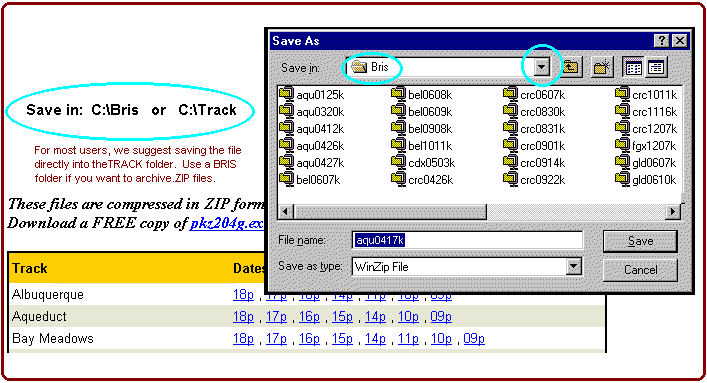
The file should be downloaded and opened in the same directory (TRACK) where the DATABASE program is located. For most users, that path will be C:\TRACK or C:\Bris-17 (not C:\MyDocuments\TRACK or anything else). Some people prefer to download the BRIS files to a "Bris" directory for archive reasons. But, ultimately, the .DRF file (after the zip file is opened) is the only data file for WATT users need.
The rule is simple: Know where your program is located and where the DRF files must be sent!
Adding "Notes" to the Name Line:
Personal "Notes" and other notations can be added to each horse's name line if
desired. This additional handicapping feature will not change the PM Rating, but it
will allow the user to modify the printouts and display additional useful information.
To add the "Notes" just hit Alt-A on the name line of any horse.
See the PM Table help section as well as the help section of the Pace Analyst.
Any other WATT Questions? Call LPC's offices at (954) 573-7236 -- Jeff Little, Publisher

Website Map to HorseRacingUSA.com
|
WATT Interactive Online - Home
To: The Tout Corner
